A video portfolio helps candidates stand out when applying for a job or for a place at college. It gives a competitive edge in admissions and in the workforce by showcasing skills, passion, and knowledge in a way a written application cannot. Hiring managers and admission committees get a sense of personality and video editing ability at the same time.
In this guide, explore what a video portfolio is, who should make one, five examples for inspiration, and how to plan and create a video with the Clipchamp video editor for education.
What is a video portfolio?
A video portfolio is a short 60-90 second video compilation of career or educational highlights. They most common format is a slideshow video which combines videos and still images.
Video portfolios sound like video resumes but they perform a different function. Creative professionals and freelancers use a video portfolio on their personal websites to exhibit finished work to prospective employers, hiring managers, clients, and brands. Students use video portfolios to demonstrate an academic track record and personal interests for college admissions committees, internships, and student clubs.
A video portfolio can be hosted on a personal portfolio website, shared via a private OneDrive, uploaded to YouTube, or attached to a micro-work platform like Upwork (opens in a new tab).
Who should make a video portfolio?
Students
Students can use a video portfolio to support an application to college, or to enter the workforce by expressing interest in an internship. It often accompanies a cover letter (opens in a new tab) or Microsoft Word resume (opens in a new tab), displaying student work to secure an internship or a creative role for part-time or full-time work. Many colleges request showreel videos for creative courses like videography and the performing arts.
Job seekers
Experienced professionals can use a corporate video portfolio to highlight their most distinguished career milestones. Some achievements are better represented visually and will provide an edge over other candidates. Project managers can include case studies of launched products. Graphic designers can narrate a show and tell on their live work. Podcast engineers can share audio and video of mixed and mastered clips. Making and hosting the video also signals creativity.
Freelancers
Professional creatives offering their services need to provide examples of their work and their previous clientele to prospective clients and hiring managers. Showcasing work in action leads to more work for creative contractors, especially video editors, designers, and website developers.
How to create a video portfolio
Choose a goal and audience
Write down a clear statement about what the portfolio video will achieve and who will be watching it. A simple purpose and a targeted audience make it easier to structure and sequence the visuals and accompanying audio.
Gather career highlights and video clips
Track down photos and video footage of career highlights. Look for several images and videos from the same milestones to keep the visuals dynamic. Entire clips are rarely needed, since the goal is the best moment from each one.
Formulate a story
Once the career and creative highlights are gathered, outline how to structure them into a narrative of professional experience. One reliable approach traces how someone became a specialist in their field, using each highlight as a sequential step in the story. It is a related format, so check the guide on how to write a video resume script for inspiration on writing a portfolio script.
Create a slideshow video
Turn the narrative structure and compilation of career highlights to create a slideshow video. It’s a simple and effective way to combine photos and videos side-by-side. Adding video overlays like photos and animated graphics over the footage makes visuals more engaging. Use videos to portray highlights with action and movement.
Five amazing video portfolio examples with tips
College admission video portfolio
This video portfolio submission for Brown University is a charming display of creativity and personality. The student uses his card artistry hobby to frame his submission, displaying a mixture of photos and videos of his card flourishing and tricks while using this interest to make him memorable.
Tip: students and content creators can recreate this style of video by recording the webcam for the main shot, then recording a voiceover for the narration over the other visuals.
Freelancer video portfolio
This video editor cleverly showcases his video editing skills in real-time in this simple but memorable video portfolio. Subtitles clearly communicate the editing effects and skills he offers. There is also a clever use of transitions to portray the before and after of the raw footage against the finished edited videos.
Tip: creative freelancers can replicate this video with text animation and using royalty-free stock audio for a smooth and subtle soundtrack.
Small agency video portfolio
This agency’s promo video portfolio conveys the company’s brand while also representing what they do. They achieve this with a cinematic combination of stirring music, text animations, and a dramatic voiceover.
Tip: startup businesses and aspiring entrepreneurs can copy this format for their own corporate video portfolio by using subtitles to reach a global audience and the Clipchamp brand kit tool to customize with a company logo, color, and font.
Videographer showreel
This showreel presents shooting and editing work together, moving through short clips from different jobs rather than playing any one of them in full. Pairing both skills in a single reel suits a freelancer who gets hired for the camera work and editing skills.
Tip: videographers can pace a reel with video transitions between excerpts and lift the footage using video enhancing effects so every clip looks finished.
Motion designer video portfolio
This animation reel cuts between short 2D and 3D sequences instead of showing a single piece from beginning to end. This style of editing showcases the designer's range, and this matters when a prospective client is scanning for a style that fits their brief.
Tip: motion designers can introduce each sequence with motion titles naming the client or the brief, so a reel reads as a body of work rather than a series of clips.
Creating a video portfolio is simple in Clipchamp for education, starting from blank or from one of the video portfolio templates. Follow the step-by-step guide below to turn career and creative highlights into an engaging video portfolio.
How to make a video portfolio in Clipchamp
Step 1. Import media or select stock footage
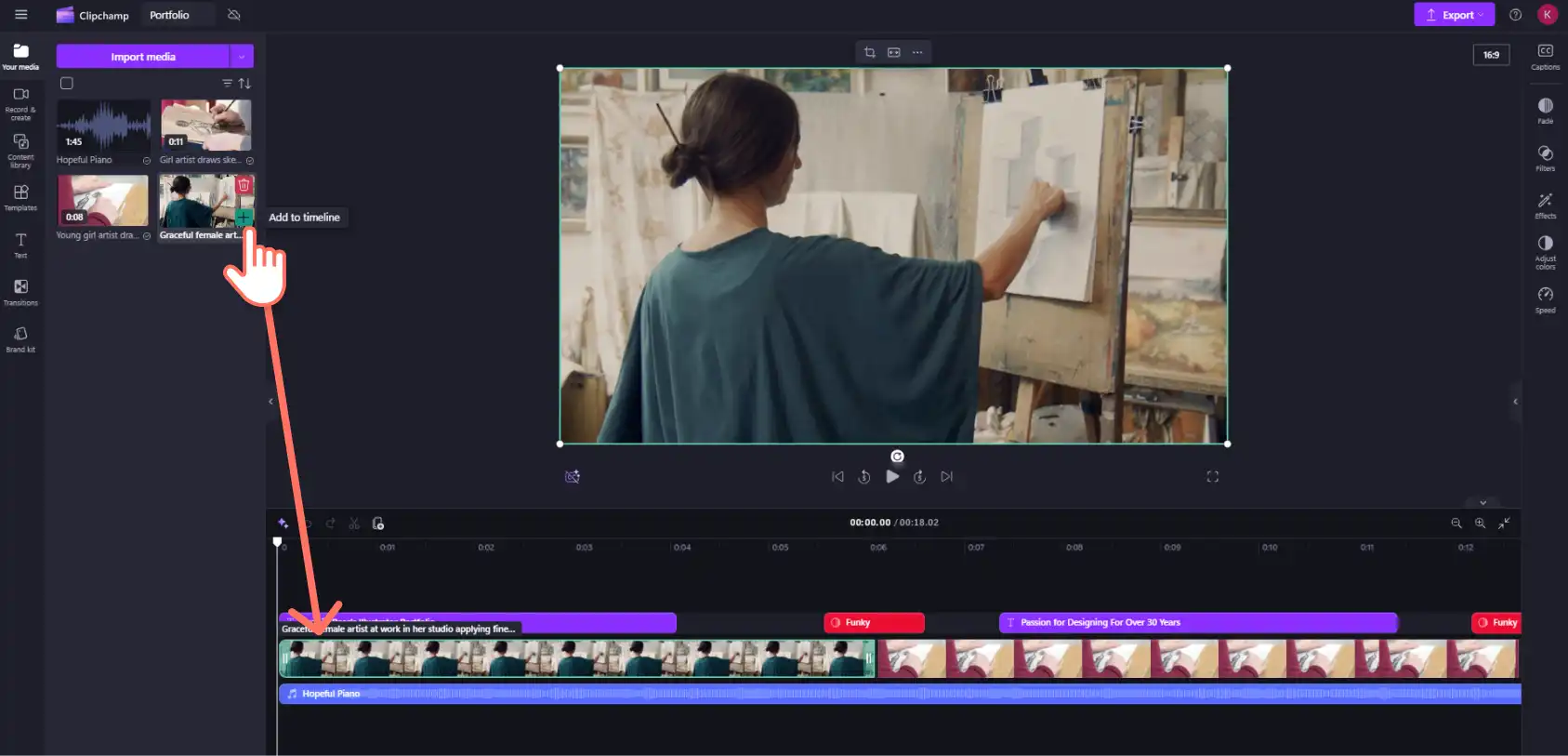
Gather career highlights in image and video form, then upload them into the Clipchamp video editor. Select the your media tab on the toolbar then click on the import media button to upload files from your device. Or connect a cloud file sharing service like OneDrive.
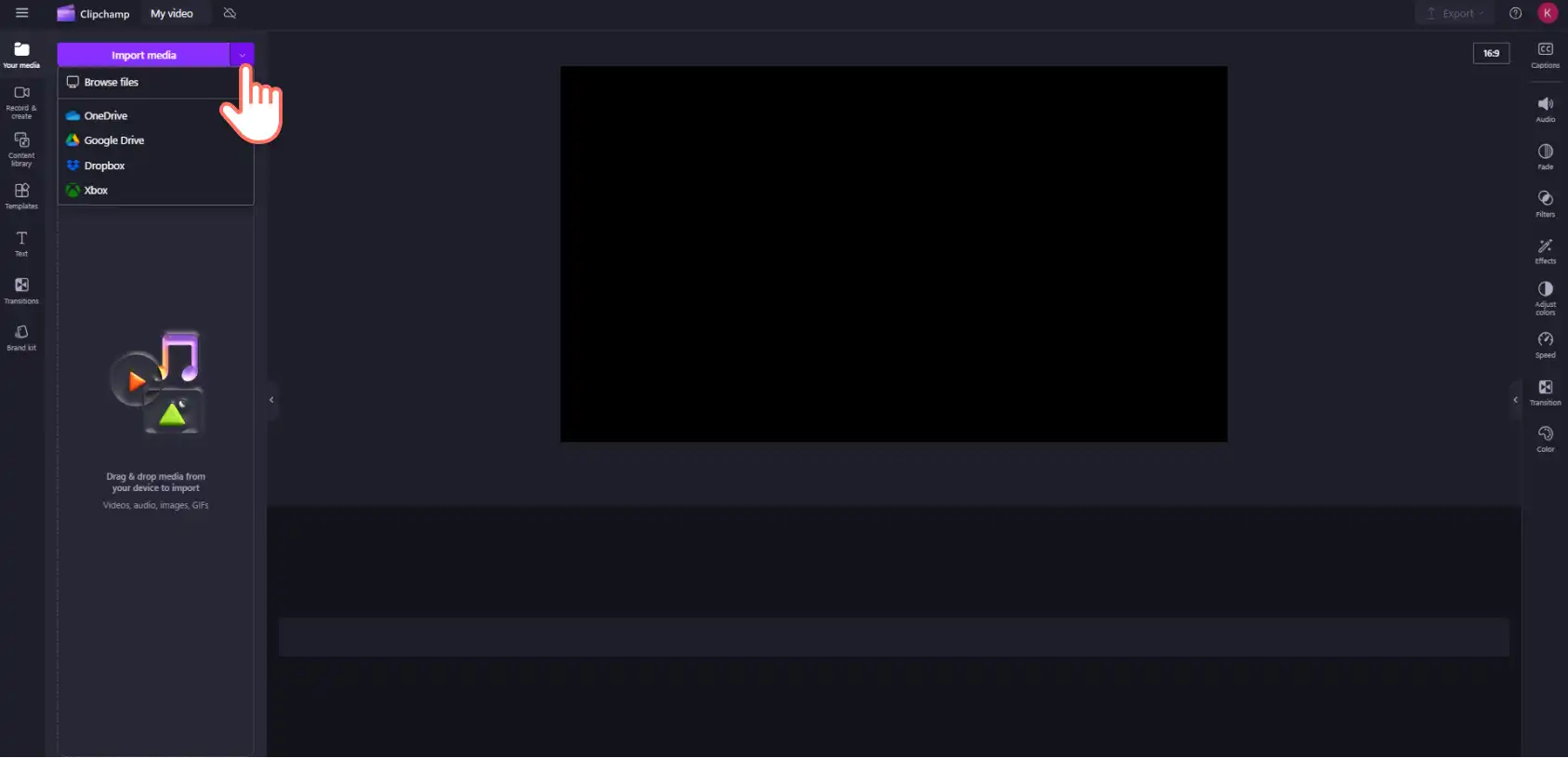
Once the video assets are uploaded, drag and drop them onto the timeline to start editing the video.
Step 2. Add video transitions
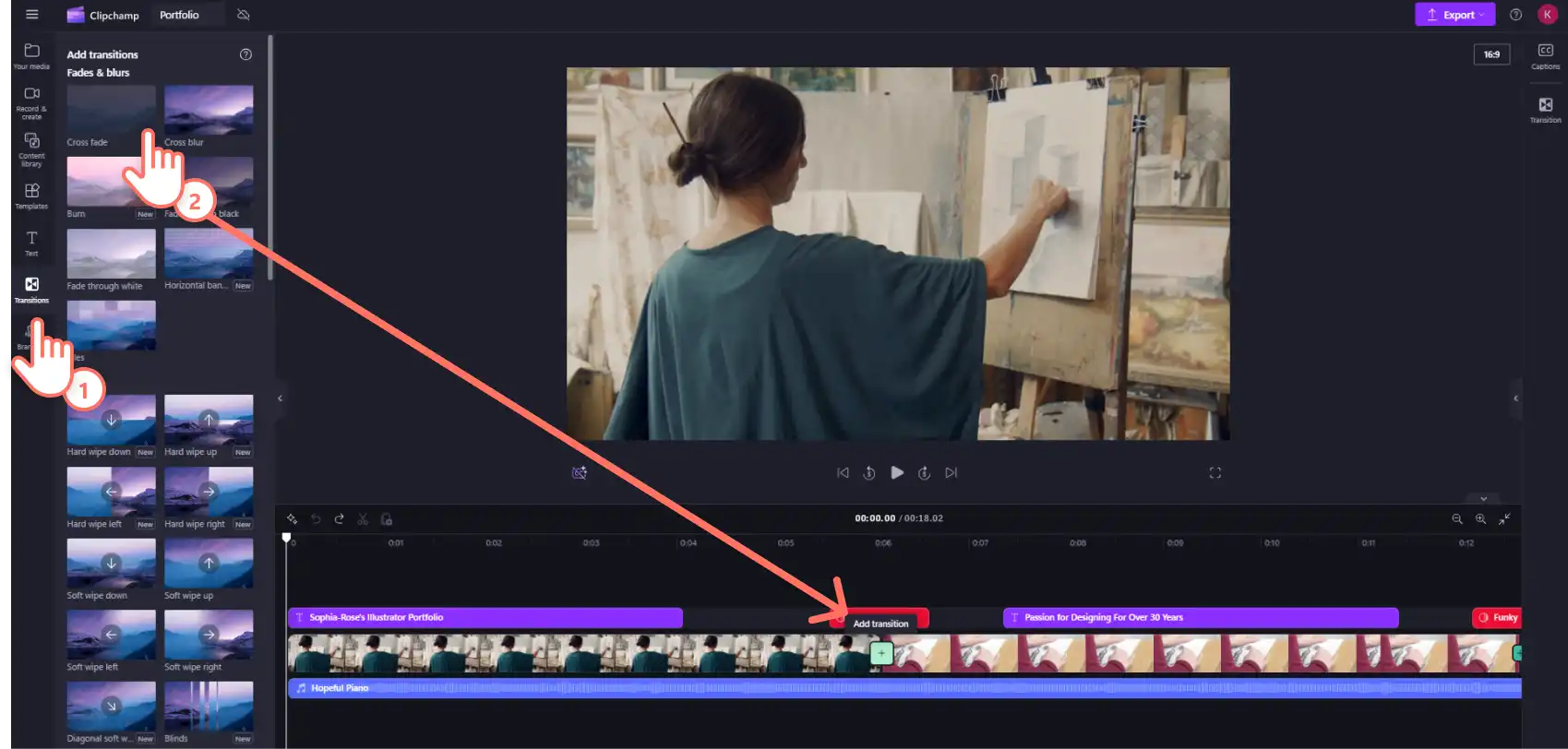
Smooth and dynamic transitions add personality to the video while helping to pace the visuals in general. To add transitions to a video, select the transitions tab on the toolbar. Find the perfect transition effect then drag and drop it between two video clips.
Step 3. Add animated text and titles
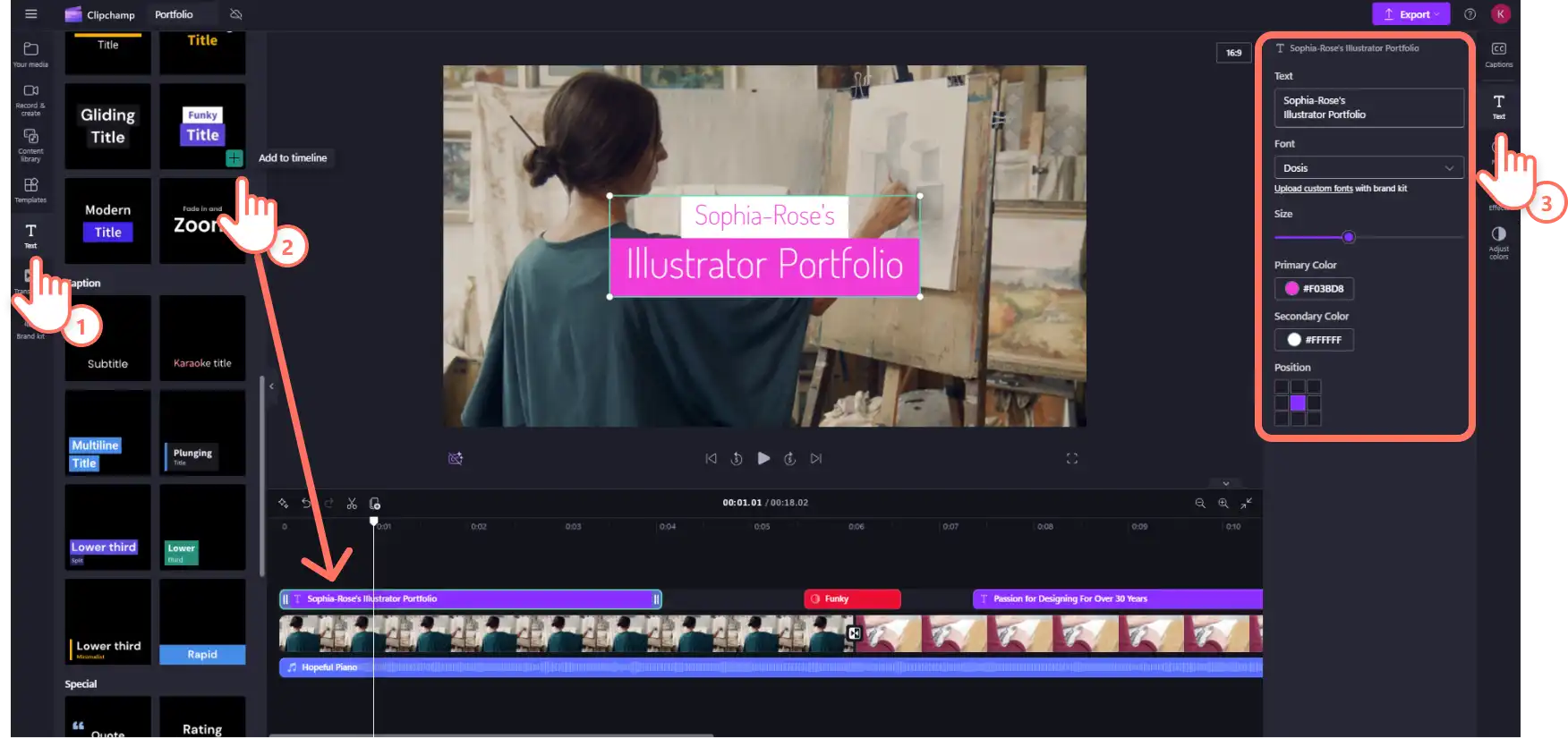
Use text and motion titles to convey key information while also representing a brand. Click on the text tab on the toolbar and scroll to find the right title style for the video. Then drag and drop it onto the timeline. Change the color and other font settings in the text tab on the property panel.
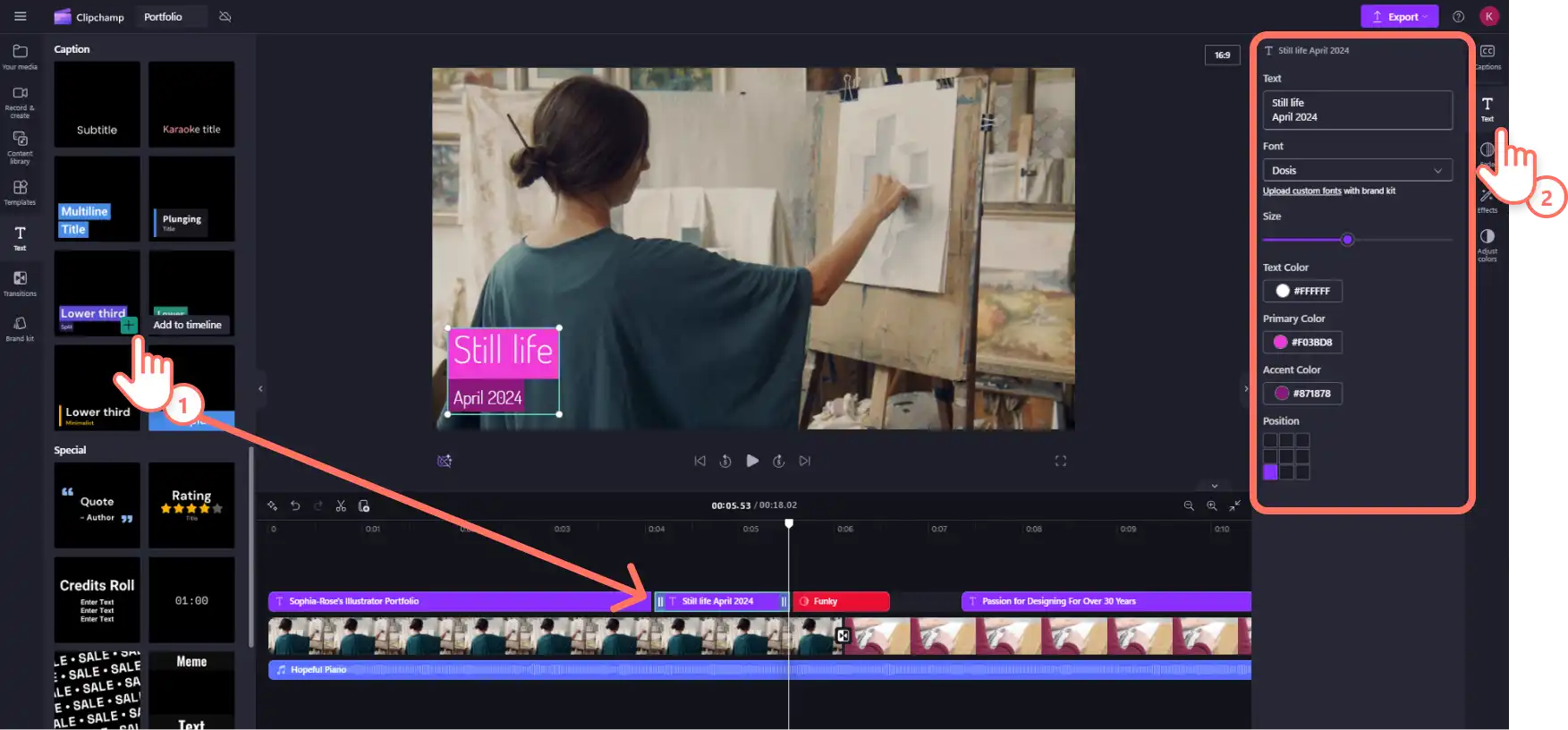
For sharing key information to enhance the flow of the video, use animated lower third graphics to add style and color to the portfolio video.
Step 4. Add music and voiceover
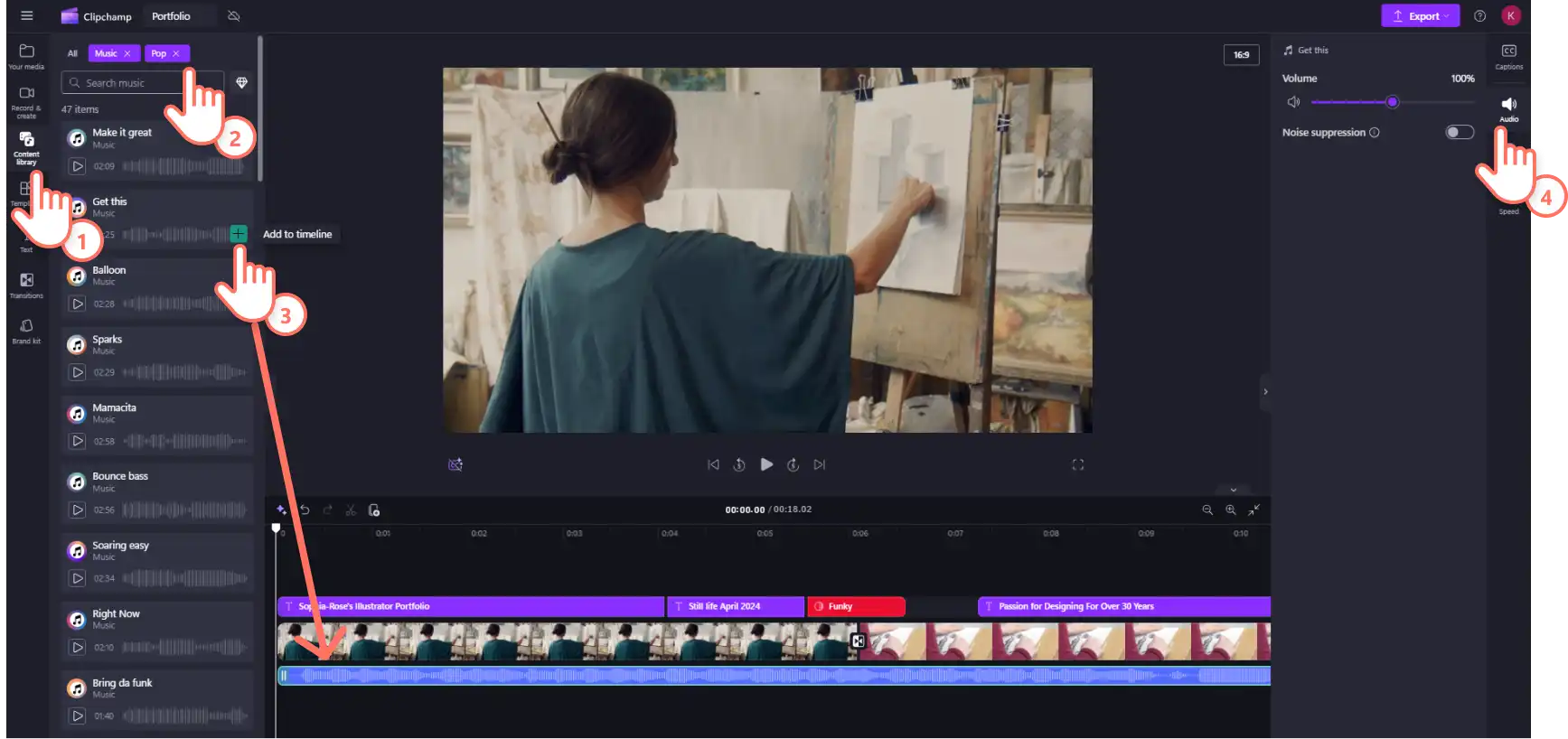
Choose a soundtrack that suits the mood of the professional video portfolio. The Clipchamp audio library is filled with royalty-free ambient background music collections, so there are engaging musical scores to choose from.
Click on the content library tab on the toolbar then select the music option from the audio drop down menu. Scroll through the selections by genre or type keywords into the search bar. Preview audio from inside the toolbar. Drag and drop a music clip onto the timeline.
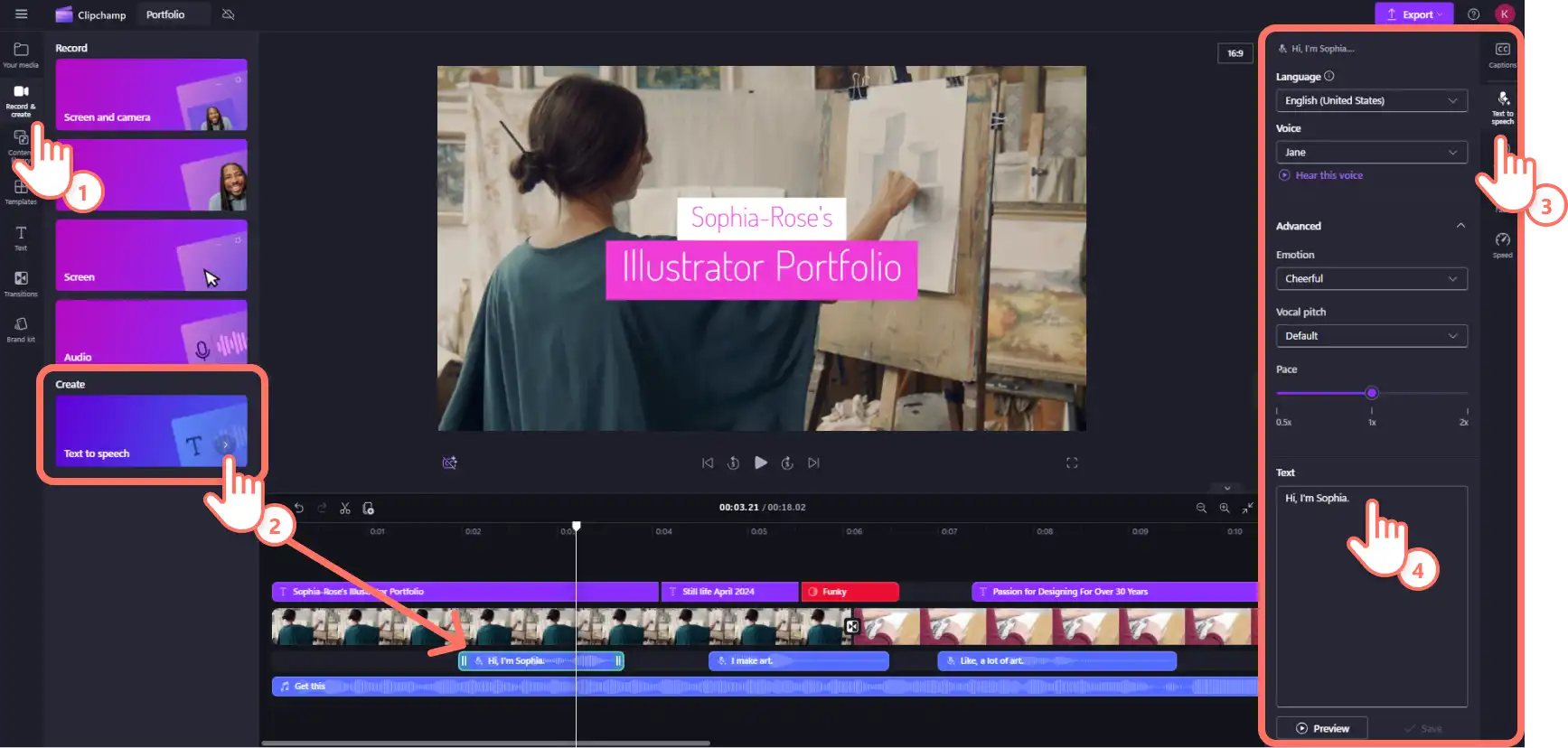
Next, narrate a video portfolio with a realistic and lifelike AI generated voiceover using our text to speech tool. Transform the words into professional-quality voiceover quickly using AI. Click on the record & create tab on the toolbar then select text to speech. This will automatically add a text asset to your timeline. Navigate to the now opened text to speech tab in the property panel to type the text and select voiceover settings. Change the voice and adjust the tone, pace, and emotion of the voiceover.
Step 5. Preview and save the video
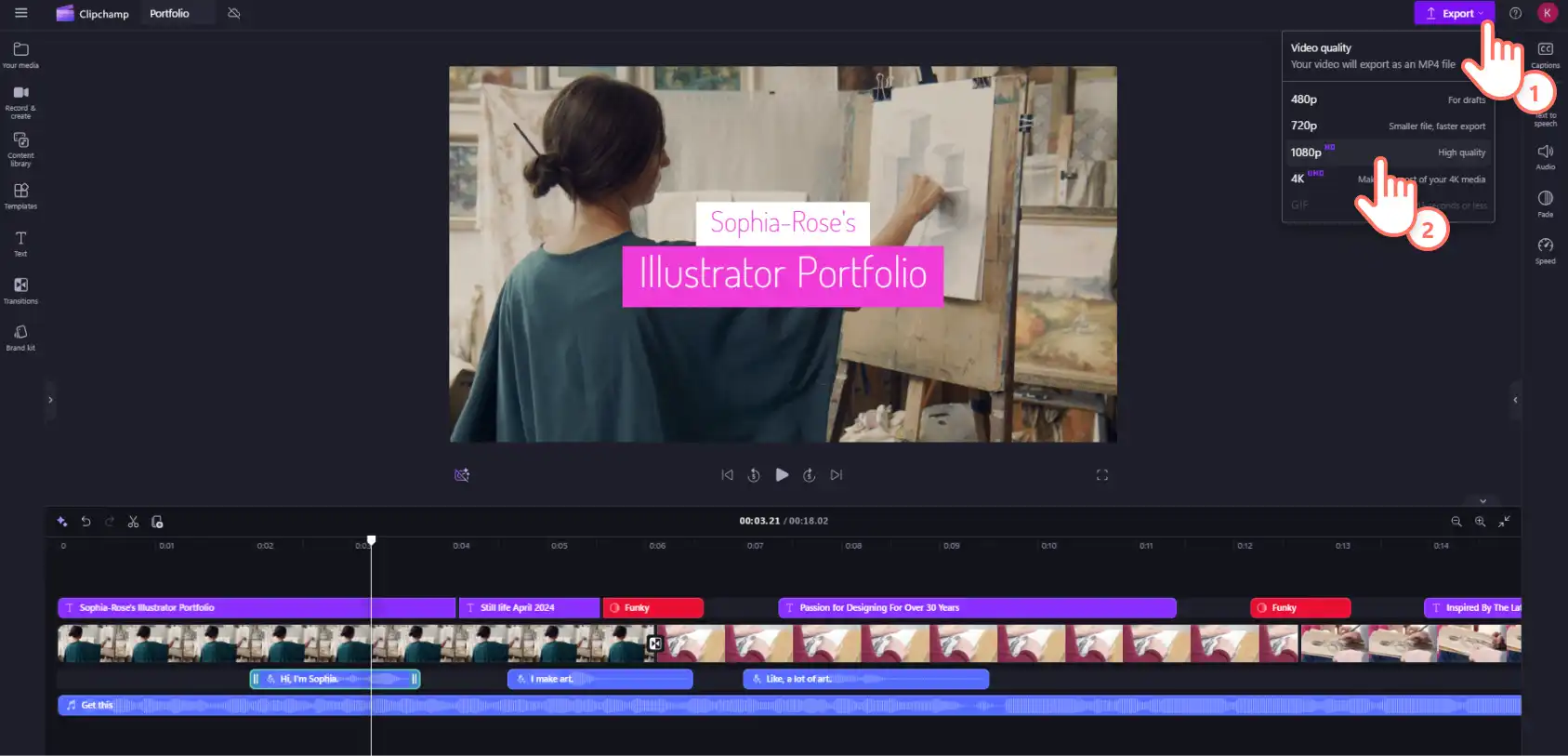
Once the editing is finished, preview the finished video to ensure everything is just right. Click on the play button underneath the preview window to do so. Click on the export button then select the preferred video resolution. Use the OneDrive integration to instantly upload to the video to cloud storage.
Craft a memorable video portfolio that stands out from the crowd. Next, explore how to enhance video slideshow presentations or find fresh sources of inspiration in these video project ideas for school.
Start creating free video for school with Clipchamp for education.
Heads up! The screenshots in this article are from Clipchamp for school accounts and the same principles apply to Clipchamp for work accounts. Clipchamp personal account tutorials may differ. Learn more.